

METATRADER 4/5 OPTIMIZATION GUIDE
VIDEO TUTORIAL
In this guide, we are going to show you a few tips to optimize your MetaTrader 4/5 platform to use less computing resources (RAM and CPU).
This guide assumes that you are not trading manually on your MT4 as we will turn off some MT4 functions that will disable rendering new candles.
Ok, so let’s start with our MetaTrader 4 optimization:
- Reduce MT4 chart bars.
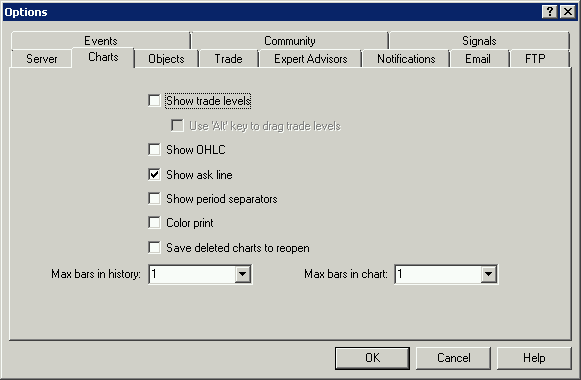
Go to: [Tools] -> [Options] (or [CTRL]+[O]). [Charts] tab and there change [Max bars in history] & [Max bars in charts] to [1]. Make sure all options are un-checked, even [Show trade levels] & [Show OHLC] should be un-checked. You won’t be watching your charts on VPS, so you don’t need those functions.
 Disable MT4 sounds.
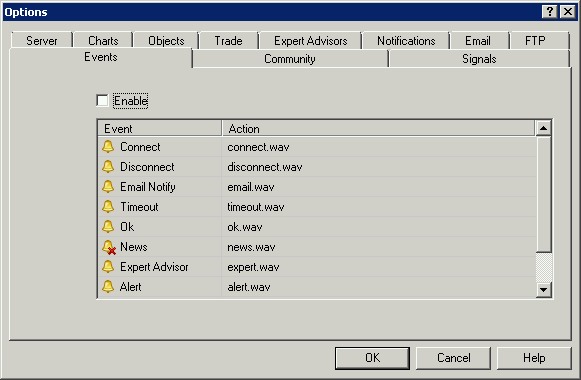
Go to: [Tools] -> [Options] (or [CTRL]+[O]). [Events] tab and un-check [Enable].
- Hide all unnecessary symbols (those that you don’t trade).
In the [Market Watch] section of your MT4 – select the symbol, right click and choose [Hide].
Hide all unnecessary symbols (those that you don’t trade).
In the [Market Watch] section of your MT4 – select the symbol, right click and choose [Hide].
- Close all unnecessary charts & Minimize MT4.
Rendering new bars on the charts take most of computing resources so we want to reduce that to the minimum.
That’s all!
After that you should restart your MetaTrader 4 terminal so the changes are saved and will take effect.